Posts

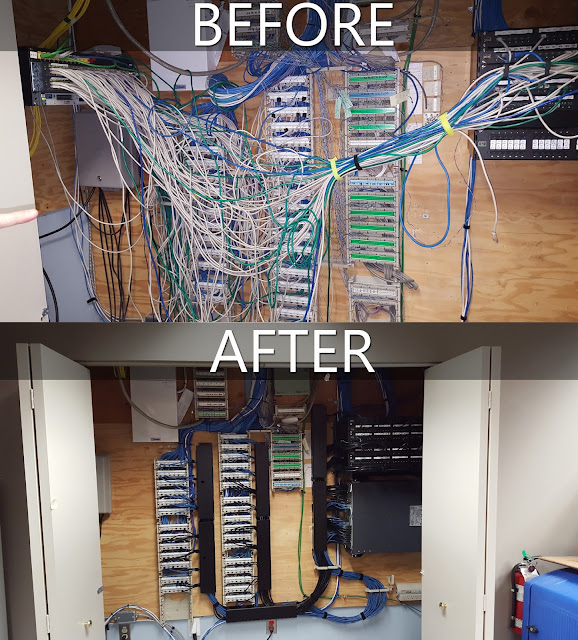
Rats Nest

Image
My team is top notch!

Warranty Void if....

Image
Our VMware vSphere 5.1 server died over the weekend. Basically the vmware-vpxd service wouldn't initialize. This prompted a call to VMware support. VMware support was on the phone with us for two days, at which point they issued the dreaded Prima Nocte of support. "Oh Sorry, it seems you are not running a supported config, we can not go any further with this case, do you agree with this statement?" We aren't running a supported config? Ouch. The VMware tech pointed us to an article outlining the maximum hosts and guests for the embedded database on vSphere 5.1 . Unfortunately for us, we are slightly over the allowed limits for 5.1. vSphere is very central to what we do, so we went down the road of restoring backups. Unfortunately that avenue ended in the same place. That darn vmware-vpxd service just would not initialize. Time to start digging.  Let see what this Linux box is doing now that it is booted. That doesn't seem normal. Let me ...

Irony

Image
My story begins with slowness, like many IT stories before it. Let me give some context. This is regarding a custom application hosted at an MSP. The problem started about a week after production launch. Staff and the broader customer base began experiencing slowness and timeouts. The usual answer ensues. "The servers look good" says MSP. "CPU doesn't go above 5%, tons of free memory, disk time is less than 1%, network utilization is low. It isn't anything on our side." Now with the onus successfully shifted, the problem lands internally. Pinging the application host at the MSP (MPLS circuit) produces a 1ms response time, impressive latency for sure. Next up, I was able to capture a "slow" event in wireshark: The first line is a query from my client to the server. The next two packets are from the server to my client. Strange result for a machine "doing nothing" as the MSP said. It took over half a second to start returning t...

In Touch with My Artistic Side

Image
Visio to represent network segmentation using firewalls and VRFs.

EFS Design for Irresponsible Admins

Image
If you have read some of my other blog posts then you know I have some design philosophies that I abide by. Let me introduce to you a new one. Irresponsibility. If your design takes into account the manual actions of people, then failure is imminent, and failure is further exacerbated by admin turnover. This leads me to my story. How do I protect user data from workstation admins tasked with supporting workstations? No this is not a rhetorical question. The design takes into account drive-by admins, i.e. connect as local admin and steal the data. I'm not really sure how many of these admins exist, however someone in the IT security department is adamant they are plentiful, and made it clear they must be stopped. So the usual EFS mantra is that a CA/SubCA should be used for the EFS/Recovery Agent certificates. I wholeheartedly agree, but in many IT shops this is a lot of complexity and headache. In addition to the complexity there is the problem of remembering to renew the data ...

Ansible: Good Things Come to Those Who Wait

I have been a windows admin for many years. This tenure has much to do with local job opportunities and less so about a staunch love of one side. As a person who attempts to stay current in both worlds, I am currently dabbling with Configuration Management or Desired State Configuration (MS Speak). Because my place of employment doesn't have a decent sized GNU/Linux deployment I am really only able to go it alone in lab environments, but hey, I still enjoy it! CM is not new, the Chef and Puppet camps have been around for quite some time. I simply never started the journey with either product, thus I won't comment on them, other than to say it was probably because I was too lazy. :) Fast forward to today and there are several in the CM space. Salt, Ansible, Puppet, Chef, etc. I did some basic research and landed on Ansible. There isn't a ton of thought that went into this conclusion, but as a long time windows admin with a disdain for agents... well you get my point. ...
Work Folders, Folder Redirection, Symbolic Links, Oh My!

Image
Roaming profiles are torture for admins, but users want their files and settings, and old habits die hard as they say. This is my dilemma. Roaming profiles have created legions of users who can't do basic configuration of many desktop applications, as they only had to tough it out once four years ago. Don't even get me started on the large mass of files and yo-yo copy pattern. Enter folder redirection, sure as long as you have good connectivity. A small branch of 10 users with a 10Mbps circuit and 10ms latency is enough to cause user revolt. Okay then, how bout we add in offline files? Get ready to cry  and  don't just take my word.... Along comes Work Folders , which i must say is something that can deal with many scenarios. Sure it is a blatant copy of Dropbox et al., but that is a good thing! Now back to dealing with my dilemma. How can I give a roaming profile like experience with good performance, while maintaining most if not all application configurations. ...

Thoughts on Storage in the Enterprise

Enterprise storage as we know it is dead. SAN and NAS devices have had their day, but that day is done, and I will be the first one to dance on their graves. I am done with these behemoth monolithic devices. HP, NetApp, Hitachi, EMC it doesn't matter, they all share a simple design principle: Put a ton of disks behind a couple servers. This principle perhaps isn't dangerous on it's own, but mix in misplaced CYA with the storage sales engine and you're left with chaos. We pay 3-4x what a disk should cost. We then take all our corporate data and put it on these devices. We in-turn leverage all kinds of silly feature that shouldn't be done on a storage target and tie business processes to it. Short and curlies anyone? In addition to the aforementioned reasons, another main cause of our pain is most well supported storage protocols suck at scaling. There have been some recent cool ideas to band-aid the shortcomings, ie  Coho Data will use the network (SDN) to make ...

Cisco VRF-Lite Guest Network and OpenDNS

My basic goal of doing this was to create a branded/managed OpenDNS enabled guest network on VRF-Lite. I didn't want to put any dependencies on the global routing process, I also wanted to avoid using any kind of OpenDNS Update Client for my cheapo adsl drop. In case anyone is curious this is a working config on c2900-universalk9-mz.SPA.153-3.M1.bin. Not sure why anyone else would ever try to do this, but this may be helpful if you do. ip vrf GUEST_VRF ip dhcp excluded-address 192.168.124.1 ip dhcp pool GUEST_NETWORK vrf GUEST_VRF network 192.168.124.0 255.255.255.0 dns-server 208.67.222.222 208.67.220.220 default-router 192.168.124.1 Create a vrf and guest network dhcp pool. ip domain lookup source-interface FastEthernet0/0/0 ip domain name guestvrf.net ip name-server 208.67.222.222 ip name-server 208.67.220.220 ip ddns update method DDNS_OPENDNS HTTP add https://USERNAME:PASSWORD@updates.opendns.com/nic/update?hostname=SITECODE interval maximum 0 1 0 0 I wanted...

DataOn CiB-9470+Spaces Backup Software Simulation

Image
Local write performance on the server is quite good. The disks are all owned by one cluster node. The storage spaces layout is a 66 disk storage pool with 4 hot spares. The volume tested is triple mirror with 22 columns and a 256KB interleave (may play with this setting). I tested with 128KB to match backup software write size. blank spots are the 4 hot spares ;)

DataOn CiB-9470 Goodness

Image
Our new backup target has a little space :)

Enable Bitlocker with Recovery Keys

Another little script to initialize the TPM and enable bitlocker for local volumes. Again, no hard coding of drive letters. Initialize-TPM Get-BitlockerVolume | Where VolumeType -eq "OperatingSystem" | Enable-Bitlocker -TPMProtector -UsedSpaceOnly -SkipHardwareTest Get-BitlockerVolume | Enable-Bitlocker -RecoveryPasswordProtector -UsedSpaceOnly -SkipHardwareTest Get-BitlockerVolume | Where VolumeType -ne "OperatingSystem" | Enable-BitlockerAutoUnlock Get-BitlockerVolume | Resume-Bitlocker

Bitlocker Recovery Key Backup to AD

A little powershell computer startup script to backup bitlocker recovery keys to AD. Wanted to see if I could make it work without hard coding drive letters. $BLVOL = Get-BitlockerVolume | Where ProtectionStatus -eq "On" | Foreach { New-Object PsObject -Property @{ MP = $_.MountPoint KPID = ($_ | Select -ExpandProperty KeyProtector | Where KeyProtectorType -eq "RecoveryPassword").KeyProtectorId ;} } $BLVOL | Foreach {Backup-BitlockerKeyProtector $_.MP $_.KPID}